- Aggregations can improve query response time but they can increase processing time and disk storage space, use up memory that could be allocated to cache, and potentially slow the speed of other queries. The latter may occur because there is a direct correlation between the number of aggregations and the duration for the Analysis Services storage engine to parse them. As well, aggregations may cause thrashing due to their potential impact to the file system cache. A general rule of thumb is that aggregations should be less than 1/3 the size of the fact table.
- Attributes that are exposed only in attribute hierarchies are not automatically considered for aggregation by the Aggregation Design Wizard. Therefore, queries involving these attributes are satisfied by summarizing data from the primary key. Without the benefit of aggregations, query performance against these attributes hierarchies can be slow. To enhance performance, it is possible to flag an attribute as an aggregation candidate by using the Aggregation Usage property.
- It is important to ensure that the partition data and member counts (such as EstimatedRows and EstimatedCount properties) accurately reflect the specific data in the partition and not the data across the entire measure group.
- "Default" Aggregation Usage property cases:
- For a dimension’s measure group granularity attribute, default means Unrestricted. The granularity attribute is the same as the dimension’s key attribute as long as the measure group joins to a dimension using the primary key attribute.
- For all attributes (except All) in many-to-many, nonmaterialized reference dimensions, and data mining dimensions, default means None.
- A natural hierarchy, default means Unrestricted, except for nonaggregatable attributes, which are set to Full (even if they are not in a user hierarchy).
- For all other dimension attributes, default means None.
- In light of the behavior of the Aggregation Usage property, use the following guidelines:
- Attributes exposed solely as attribute hierarchies- If a given attribute is only exposed as an attribute hierarchy such as Color, you may want to change its Aggregation Usage property as follows:
- First, change the value of the Aggregation Usage property from Default to Unrestricted if the attribute is a commonly used attribute or if there are special considerations for improving the performance in a particular pivot or drilldown. For example, if you have highly summarized scorecard style reports, you want to ensure that the users experience good initial query response time before drilling around into more detail.
- While setting the Aggregation Usage property of a particular attribute hierarchy to Unrestricted is appropriate is some scenarios, do not set all attribute hierarchies to Unrestricted. Increasing the number of attributes to be considered increases the problem space the aggregation algorithm must consider. The wizard can take at least an hour to complete the design and considerably much more time to process. Set the property to Unrestricted only for the commonly queried attribute hierarchies. The general rule is five to ten Unrestricted attributes per dimension.
- Next, change the value of the Aggregation Usage property from Default to Full in the unusual case that it is used in virtually every query you want to optimize. This is a rare case, and this change should be made only for attributes that have a relatively small number of members.
- Infrequently used attributes—For attributes participating in natural hierarchies, you may want to change the Aggregation Usage property from Default to None if users would only infrequently use it. Using this approach can help you reduce the aggregation space and get to the five to ten Unrestricted attributes per dimension.
Showing posts with label MDX. Show all posts
Showing posts with label MDX. Show all posts
Monday, June 16, 2014
SQL Server 2008 R2 Analysis Services Performance Guide Summary - Aggregation

SQL Server 2008 R2 Analysis Services Performance Guide Summary - Optimizing MDX
- Before beginning optimization, you need reproducible cold-cache baseline measurements. To this you have to clear the FE (Formula engine) cache and the SE (Storage Engine) cache by running:<ClearCache xmlns="http://schemas.microsoft.com/analysisservices/2003/engine"><Object><DatabaseID>Butmah Cube 4</DatabaseID></Object></ClearCache>Also you have to clear the file system cache by using either Fsutil.exe, RAMMap (careful when using Fsutil or RAMMap, both cause disruption to service), or Analysis Services Stored Procedure Project (CodePlex).
- Execute the query you want to optimize and then use SQL Server Profiler with Query Subcube Verbose and Get Data From Aggregation events. The text in Query Subcube Verbose contains information for each attribute in every dimension:
- 0: Indicates that the attribute is not included in query (the All member is hit).
- * : Indicates that every member of the attribute was requested.
- + : Indicates that two or more members of the attribute were requested.
- - : Indicates that a slice below granularity is requested.
- <integer value> : Indicates that a single member of the attribute was hit. The integer represents the member’s data ID.
- Isolate the cause of the performance issue, then look if the problem lies in the FE or in the SE, by finding the amount of time the SE spends scanning data, so look for the "Duration" spend by event subclass = 22, if this is the case, consider optimizing dimension design, designing aggregations, or using partitions to improve query performance. In addition, you may want to consider optimizing the disk subsystem. If the majority of time is not spent in the storage engine but in the query processor, focus on optimizing the MDX script or the query itself. Note, the problem can involve both the formula and storage engines. A “fragmented query space” can be diagnosed with SQL Server Profiler if you see many query subcube events generated by a single query. Each request may not take long, but the sum of them may. If this is the case, consider warming the cache to make sure subcubes and calculations are already cached. Also, consider rewriting the query to remove arbitrary shapes, because arbitrary subcubes cannot be cached. If the cube and MDX query are already fully optimized, you may consider doing thread, memory, and configuration tuning of the cube. You may even want to look at larger hardware.
- Almost always, performance obtained by using subspace (or block computation) mode is superior to that obtained by using cell-by-cell (nor naïve) mode. Some of the most common reasons that cause NOT to use subspace mode are: Set aliases, Late binding in functions (A query is late-bound if an argument can be evaluated only in context, like LinkMember, StrToSet, StrToMember, and StrToValue), User-defined stored procedures, LookupCube, and cell level security.
- The Analysis Services engine is very efficient at using sparsity of the data to improve performance. Adding calculations with nonempty values replacing empty values does not allow Analysis Services to eliminate these rows.
- When you write expressions as products of two other expressions, place the sparser one on the left-hand side. Recall, an expression is sparse if there are few non-null values compared to the total number of cells.
- One of the most common errors in MDX scripting is using IIf when the condition depends on cell coordinates (e.g. [Date].[Calendar].CurrentMember.Level) instead of values. If the condition depends on cell coordinates, use scopes and assignments (as described earlier).
- The IIf function takes three arguments:IIf(<condition>, <then branch>, <else branch>)Where the condition evaluates to true, the value from the then branch is used; otherwise the else branch expression is used. Note the term "used", one or both branches may be evaluated even if the value is not used. It may be cheaper for the engine to evaluate the expression over the entire space and use it when needed (called eager plan), than it would be to chop up the space into a potentially enormous number of fragments and evaluate only where needed (termed strict plan).... read more about when and how to force eager in page 53.
- Partial expressions (those that are part of a calculated member or assignment) and cell properties are not cached. So if an expensive subexpression is used more than once, consider creating a separate calculated member, then use that new calculated member in the original one, this allows the query processor to cache and reuse... page 56.
Thursday, January 17, 2013
MDX PeriodsToDate, a more efficient function
Prerequisite: installation of Analysis Services Stored Procedure Project
The following are examples for GetEfficientPeriodsToDateSet a more efficient stored procedure to get what you get from PeriodsToDate.
If you run the following MDX query you are aiming to get the [Normal] measure for all dates starting from 2012-01-01 to 2012-05-08:
the following is part of the result, and it is 130 rows, each row represents a day in 2012 from 2012-01-01 to 2012-05-08
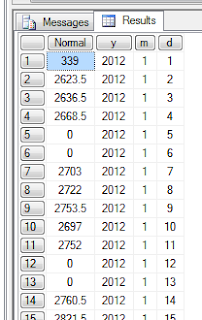

By the way GetEfficientPeriodsToDateSet function has a very similar signature to the PeriodsToDate MDX function. The first parameter (LevelName) is a string specifying the level name. The second parameter (MemberExpression) is a valid MDX member expression.
Another example on this function could be getting all dates till 2012-05-08:

More signature can be found in:
http://asstoredprocedures.codeplex.com/wikipage?title=EfficientToDate&referringTitle=Home
The following are examples for GetEfficientPeriodsToDateSet a more efficient stored procedure to get what you get from PeriodsToDate.
If you run the following MDX query you are aiming to get the [Normal] measure for all dates starting from 2012-01-01 to 2012-05-08:
with member [y] as CSTR([D
Date].[YEAR].CurrentMember.Name)
member [m] as CSTR([D Date].[month no].CurrentMember.Name)
member [d] as CSTR([D Date].[day].CurrentMember.Name)
select
{[Measures].[Normal],[y],[m],[d]} on 0,
PeriodsToDate([D
Date].[Hierarchy].[YEAR],[D Date].[Hierarchy].[YEAR].[2012].[5].[8]) on 1
from [TC Cube]
the following is part of the result, and it is 130 rows, each row represents a day in 2012 from 2012-01-01 to 2012-05-08

but look at the result of the following MDX query which uses ASSP.GetEfficientPeriodsToDateSet function:
with member [y] as CSTR([D
Date].[YEAR].CurrentMember.Name)
member [m] as CSTR([D Date].[month no].CurrentMember.Name)
member [d] as CSTR([D Date].[day].CurrentMember.Name)
select
{[Measures].[Normal],[y],[m],[d]} on 0,
ASSP.GetEfficientPeriodsToDateSet("Year",[D
Date].[Hierarchy].[YEAR].[2012].[5].[8]) on 1
from [TC Cube]
This time the result is just 13 rows, the first four rows represents the first four months of 2012 and [Normal] for those rows is the total for each month, the reset represents the days of month 5 of 2012 till 2012-05-08
Even though there is a big difference between the number of rows resulted from the first query and those from the second one, but if you compute the total of [Normal] you will find it is the same and equals 293640.
The benefit of ASSP.GetEfficientPeriodsToDateSet is clear when used in calculated measure. generating the result is more faster and efficient; as you have to iterate over 13 rows (in this case) instead of 130.By the way GetEfficientPeriodsToDateSet function has a very similar signature to the PeriodsToDate MDX function. The first parameter (LevelName) is a string specifying the level name. The second parameter (MemberExpression) is a valid MDX member expression.
Another example on this function could be getting all dates till 2012-05-08:
with member [y] as CSTR([D
Date].[YEAR].CurrentMember.Name)
member [m] as CSTR([D Date].[month no].CurrentMember.Name)
member [d] as CSTR([D Date].[day].CurrentMember.Name)
select
{[Measures].[Normal],[y],[m],[d]} on 0,
ASSP.GetEfficientPeriodsToDateSet("(All)",[D
Date].[Hierarchy].[YEAR].[2012].[5].[8]) on 1
from [TC Cube]

More signature can be found in:
http://asstoredprocedures.codeplex.com/wikipage?title=EfficientToDate&referringTitle=Home
Thursday, January 10, 2013
Illustrating Examples for MDX Navigation Functions for Accessing Extended Relatives
The following are illustrating examples that show the difference between the following MDX navigation functions:
| Function | Description |
| Ancestor( Member, Level | Distance ) | Returns a member’s ancestor from a given level |
| Ancestors( Member, Level | Distance ) | Returns a member’s ancestor from a given level as a single-member set |
| Ascendants( Member ) | Returns the complete set of a member’s ancestors, including the given member itself |
| Descendants(Member | {Set}[, Level | Distance [, Flag ]]) | Returns the descendants of a member(s) from a given level as modified by one of eight optional flags |
| Cousin( Member1, Member2 ) | Returns the member in the same relative position as the (first) specified member but under the (second) member of a higher level |
In the following examples we will use the date dimension [D Date], which contains a [Hierarchy]: [YAER] -> [MONTH NO] -> [Day], and we will use [Measures].[Normal] as a measure.
No navigation function


select
[Measures].[Normal] on 0,
([D Date].[Year].[2012],[D
Date].[Hierarchy].[Month No] ) ON ROWS
from [TC Cube]
_________________________________________________________________________________
Ancestor and Ancestors
Almost identical, the difference between them is that the Ancestor function returns a reference to the ancestor member, whereas the Ancestors function returns the ancestor member as a single-member set.
select
[Measures].[Normal] on 0,
([D Date].[Year].[2012],Ancestor([D Date].[Hierarchy].[Year].[2012].[5],[D
Date].[Hierarchy].[Year] )) ON ROWS
from [TC Cube]
_________________________________________________________________________________
Ascendants
select
[Measures].[Normal] on 0,
([D Date].[Year].[2012],Ascendants([D Date].[Hierarchy].[Year].[2012].[5]
)) ON ROWS
from [TC Cube]
_________________________________________________________________________________
Cousin
In the following query we want to get one of 5/2012 cousins which is 5/2011.

Remember that the Cousin function returns the member in the same relative position as the (first) specified member but under the (second) member of a higher level.
select
[Measures].[Normal] on 0,
([D Date].[Year].[2011],Cousin([D Date].[Hierarchy].[Year].[2012].[5],[D Date].[Hierarchy].[Year].[2011]
)) ON ROWS
from [TC Cube]
_________________________________________________________________________________
Descendants
And the following are the flags that can be used to determine the returned set:
| Flag | Description |
| SELF (or no flag) | Instructs the function to return the descendant members of the identified level |
| AFTER | Instructs the function to return the descendant members in the levels below the identified level |
| BEFORE | Instructs the function to return the descendant members in the levels prior to the specified level and including the specified member |
| SELF_AND_AFTER | Instructs the function to return the set representing the combination of those returned by the SELF and AFTER flags |
| SELF_AND_BEFORE | Instructs the function to return the set representing the combination of those returned by the SELF and BEFORE flags |
| SELF_BEFORE_AFTER | Instructs the function to return the set representing the combination of those returned by the SELF, BEFORE, and AFTER fl ags. The set returned is the complete set of descendants of the specifi ed member. |
| BEFORE_AND_AFTER | Instructs the function to return the set representing the combination of those returned by the BEFORE and AFTER flags. This set returns the complete set of descendants of the specified member excluding the members of the identified level. |
| LEAVES | Instructs the function to return the leaf-level descendants of the specified member between the specified member and the identified level |
select
[Measures].[Normal] on 0,
([D Date].[Year].[2012],Descendants([D Date].[Hierarchy].[Year].[2012],[D
Date].[Hierarchy].[Month no],self )) ON ROWS
from [TC Cube]
select [Measures].[Normal] on 0,
([D Date].[Year].[2012],Descendants([D Date].[Hierarchy].[Year].[2012],[D Date].[Hierarchy].[Month no],After )) ON ROWS
from [TC Cube]
Gets all the days of 2012
select
[Measures].[Normal] on 0,
([D Date].[Year].[2012],Descendants([D Date].[Hierarchy].[Year].[2012],[D
Date].[Hierarchy].[Month no],before )) ON ROWS
from [TC Cube]
select
[Measures].[Normal] on 0,
([D Date].[Year].[2012],Descendants([D Date].[Hierarchy].[Year].[2012],[D
Date].[Hierarchy].[Month no],LEAVES )) ON ROWS
from [TC Cube]
Tuesday, January 8, 2013
Get Current Date by MDX Query
NOW() is the function that gets you the current date. For example if you want to get a "measure" (let's say number of hours) for the last year's months, then write something like:
Read in the following link for more examples on How To Obtain the Current Day with a MDX Query or Expression in SQL Server
select [Measures].[Hrs] on
0,
Descendants(filter([D Date].[Hierarchy].[YEAR],[D Date].[year].currentmember.membervalue=YEAR(NOW())-1),[D
Date].[Hierarchy].[MONTH],LEAVES) on 1
from [Cube]
Read in the following link for more examples on How To Obtain the Current Day with a MDX Query or Expression in SQL Server
Monday, December 3, 2012
Subscribe to:
Posts (Atom)